Integrations
Find your provider and learn how to connect, restore access, and get help.
Choose the tool your location uses. Each guide says what it does, what to check in Sadie, and who to contact. Use the Help Center search to find a provider by name.
Find your connection
Sadie sets up booking channels and add-ons, and you see each location's status in Settings, Connections. Contact support to change them. Point of sale is the exception: company admins and group managers can also connect or disconnect it for their locations, and each guide below says how.
Open Settings, then Connections, then choose Booking, Point of sale or Add-ons. Check the location named under the page title before you read a status. Location managers do not see the Connections row. See Connections for the three views.
Point of sale
Square needs a Sadie phone number, Toast starts in its partner portal, Veloce uses a connector pairing code, and Deliverect starts with a channel ID. Start with the guide for your provider.

Square

Toast

Veloce

Deliverect
Booking
Booking is read-only for you. A location with no booking system shows Sadie Answers. The guides also cover existing channels shown in your location settings. Contact support to confirm what is available before you plan a new provider.

NBI

Yelp

Obee

EatClub

ResDiary

SevenRooms

Libro

OpenTable

Google Calendar
Answering questions
With Sadie Answers, Sadie answers callers and responds to their questions. Sadie Answers does not take bookings.

Add-ons
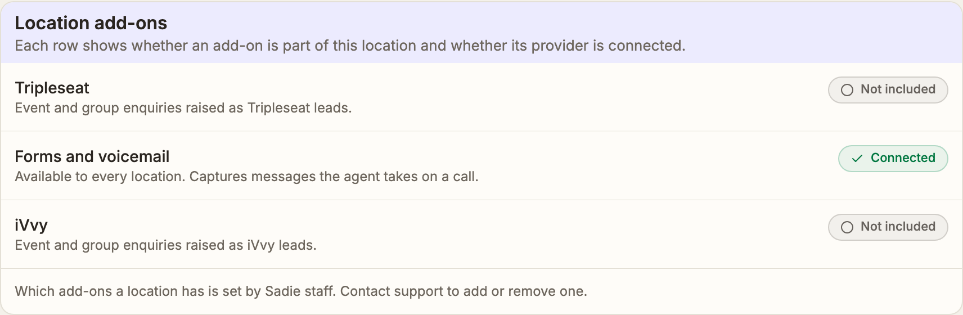
Add-ons are read-only for you. Not included means Sadie has not added the service to this location. Not connected means the add-on is part of this location but setup is unfinished. Reconnect needed means its account access must be renewed.
Tripleseat

iVvy
Forms and voicemail
Get help with a connection
Start with Sadie for a problem in Connections or a missing order, booking, or enquiry after a call. The provider handles access to its own account and problems inside its service. Each guide names the relevant team.
Find Connections in Settings to check the status for your location.