Notification settings
Choose what buzzes your phone, and set the hours when nothing does.
The app would rather you turned off the kinds you do not want than turned Sadie Resto off in your phone's settings. This screen is where you do that.
Open it from the gear in the top corner of the notification center, or from Notifications in Settings. The screen is headed Notifications.
Every change saves as you make it. A short Saved confirmation appears each time.
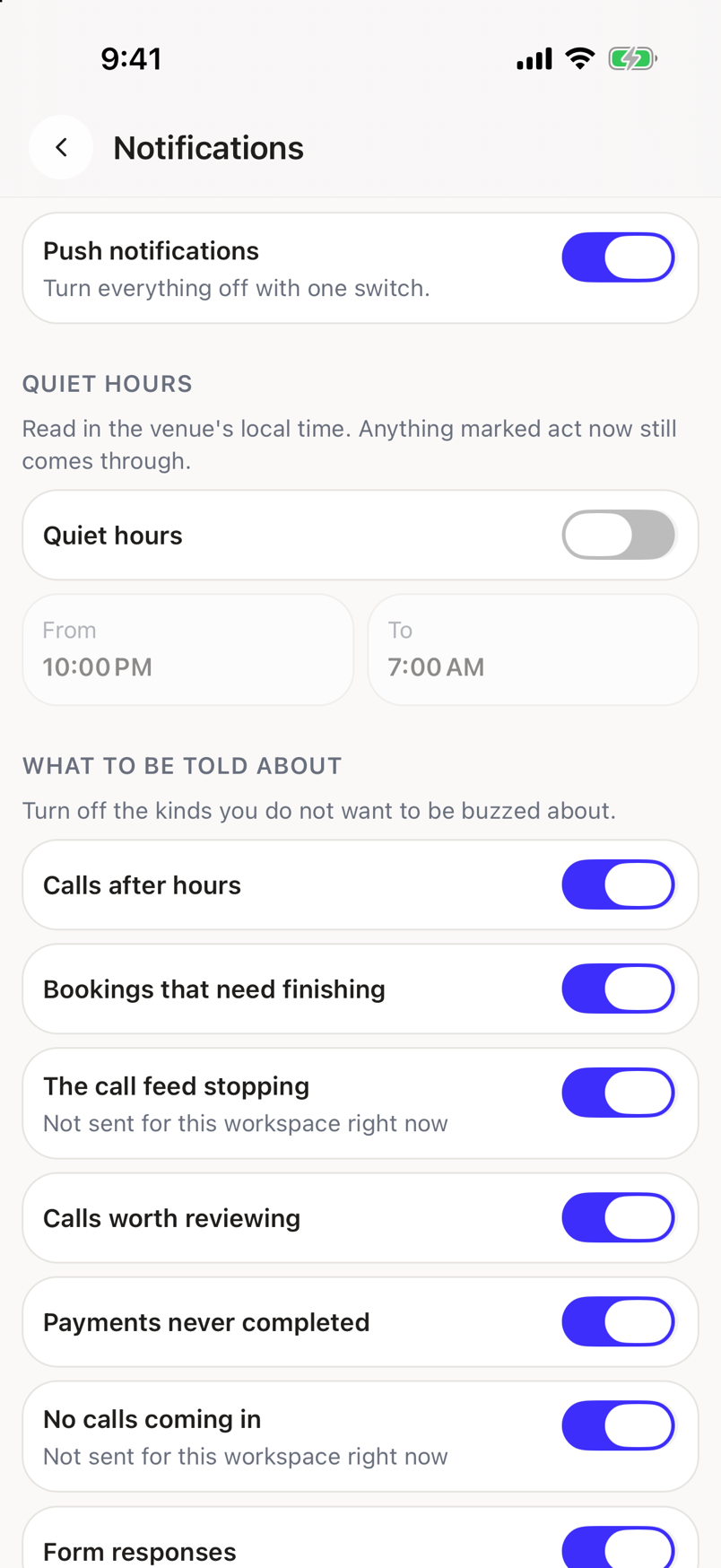
The master switch
Push notifications is the first row, with the hint Turn everything off with one switch.
Turn it off and nothing buzzes your phone. The rest of the screen goes gray while it is off, because there is nothing left to choose. Notifications still land in the notification center; they just stop reaching your pocket.
Quiet hours
Turn on Quiet hours and set the window with the From and To buttons. Each button opens a list of times on the half hour; tap the one you want and the list closes.
The hint on this section is doing real work, so read it once:
Read in the venue's local time. Anything marked act now still comes through.
Two things follow from that.
- The window is the venue's night, not your phone's. Set it once and it stays right when you travel.
- An item the app treats as act now still buzzes. The line going dead at 1am is worse news at 8am, so that override is real.
The From and To buttons stay gray until both Push notifications and Quiet hours are on.
What to be told about
The last section, hinted Turn off the kinds you do not want to be buzzed about., has one switch per kind of item.
| Switch | You are told when |
|---|---|
| Calls after hours | Somebody called or left a message while the venue was closed. |
| Bookings that need finishing | A booking was started and never completed. |
| The call feed stopping | Calls stop reaching the app. |
| Calls worth reviewing | A call is worth a listen, such as a transfer nobody answered. |
| Payments never completed | A payment link was sent and never paid. |
| No calls coming in | Nothing has come in when something should have. |
| Form responses | Somebody filled in one of your forms. |
| Event enquiries | Somebody asked about an event. |
Turning a switch off here only stops the buzz. The item still arrives in the Inbox and still counts towards Needs action.
Not sent for this workspace right now
A row carrying this line is switched off for your whole company, not by you. Leaving your switch on will not bring it back. An administrator changes that in the web app.
If a change does not save
You get That did not save. Try again. and the switch snaps back to what the app actually has stored, so what you see on screen is always the setting that is in force. Try again, and check your connection if it keeps failing.
These settings are yours
They belong to you and to the company you are in, not to a venue. Switching venue does not change them. See What changes per venue.